
THE AI CREATIVE STUDIO FOR GAME PRODUCTION FROM FIRST SKETCH TO SHIPPED ASSET_
Concept art, character design, 3D textures, scene composition, video — powered by AI, driven by a visual node canvas, and guided by an autonomous creative agent. One app. Every asset.
FROM IDEA TO MATERIALIZATION.
Studios spend weeks hand-painting textures. Small teams can't afford dedicated artists. We built a studio that does it in seconds.
From idea to game-ready. In minutes, not days.
Seven steps. One app. Watch how Artyx takes you from a rough concept to a shipped asset — without leaving the canvas.
Start with anything.
A 3D model. A reference image. A rough sketch on a napkin. Drag it onto the canvas and Artyx figures out the rest — no import wizards, no format headaches. Your creative process starts wherever you are.
Build visual pipelines.
Connect prompts, references, and models into node-based workflows. Each generation feeds the next — concept art informs characters, characters inform scenes. Your entire creative pipeline, wired in one canvas.
Say it. See it.
Type what you want. Artyx generates up to 10 variations at once — geometry-aware textures that actually follow your UV layout. No more fighting AI to understand 3D. It just works.
See it on your model. In real time.
Textures render directly onto your mesh as they generate. Rotate, zoom, compare side by side. What you see here is exactly what your game engine gets — no surprises after export.
Meet your AI creative director.
AGDA sees your canvas, understands your models, and knows what you're building. Ask it to explore art directions, run entire pipelines, or handle the repetitive work — while you focus on the creative calls that matter.
Fine-tune every pixel.
Paint masks, inpaint regions, adjust materials with surgical precision. The built-in editor gives you full control over every generated asset — without ever leaving the app.
Ship it.
Bake UV atlases. Export production-ready textures. Drop assets straight into Unity, Unreal, Godot, or Blender — one click, zero friction. From idea to game-ready in minutes, not days.
- IMPORT MODEL
- CONNECT NODES
- DESCRIBE & GENERATE
- PREVIEW RESULTS
- CHAT WITH AGDA
- OBJECT EDITOR
- EXPORT & INTEGRATE
Start with anything.
A 3D model. A reference image. A rough sketch on a napkin. Drag it onto the canvas and Artyx figures out the rest — no import wizards, no format headaches. Your creative process starts wherever you are.
Build visual pipelines.
Connect prompts, references, and models into node-based workflows. Each generation feeds the next — concept art informs characters, characters inform scenes. Your entire creative pipeline, wired in one canvas.
Say it. See it.
Type what you want. Artyx generates up to 10 variations at once — geometry-aware textures that actually follow your UV layout. No more fighting AI to understand 3D. It just works.
See it on your model. In real time.
Textures render directly onto your mesh as they generate. Rotate, zoom, compare side by side. What you see here is exactly what your game engine gets — no surprises after export.
Meet your AI creative director.
AGDA sees your canvas, understands your models, and knows what you're building. Ask it to explore art directions, run entire pipelines, or handle the repetitive work — while you focus on the creative calls that matter.
Fine-tune every pixel.
Paint masks, inpaint regions, adjust materials with surgical precision. The built-in editor gives you full control over every generated asset — without ever leaving the app.
Ship it.
Bake UV atlases. Export production-ready textures. Drop assets straight into Unity, Unreal, Godot, or Blender — one click, zero friction. From idea to game-ready in minutes, not days.
One Studio, Every Asset
Generate, compose, texture, animate — the full creative pipeline for game production in a single app.
AI Image Generation
Generate concept art, character sheets, weapon designs, and environment art from text prompts. Explore 1-10 variations per generation at up to 4K resolution.
Visual Node Canvas
Drag-and-drop node editor where 3D models, images, references, and prompts connect into creative pipelines. Non-linear workflows that match how you actually think.
AGDA — Your AI Teammate
An autonomous creative agent with 40+ tools. Generate art, edit textures, remove backgrounds, upscale, compose scenes — or let it execute entire pipelines for you.
3D Texturing & Preview
Generate geometry-aware textures across 6 views, preview them on your mesh in real time, and bake everything into a production-ready UV atlas with one click.
Video Generation
Turn any image or scene into an 8-second animated clip. Character turnarounds, action loops, promotional trailers — generated directly from your canvas.
Magic Brush & Editing
Paint masks to guide AI refinement. Inpaint, recolor, add wear, enhance details. Before/after comparison built in. Fine-tune any generated asset without leaving the app.
Built for Artists Who Ship Games
You've heard the skepticism. Here's why teams are switching anyway.
One App, Full Pipeline
Stop bouncing between Midjourney, Photoshop, Substance Painter, and your game engine. Generate, edit, bake, and export — one tool, zero alt-tabs.
Accelerate, Don't Replace
AI gets you to 80% in minutes instead of hours. You handle the last 20% — the hand-touches, the creative decisions, the polish that makes it yours.
Your Vision, Your Control
Every output needs your approval. Adjust, regenerate, paint over, reject. The AI proposes — you decide. You're still the artist. You're still the critic.
AI That Creates
With You,
Not For You
One Pipeline, Start to Finish
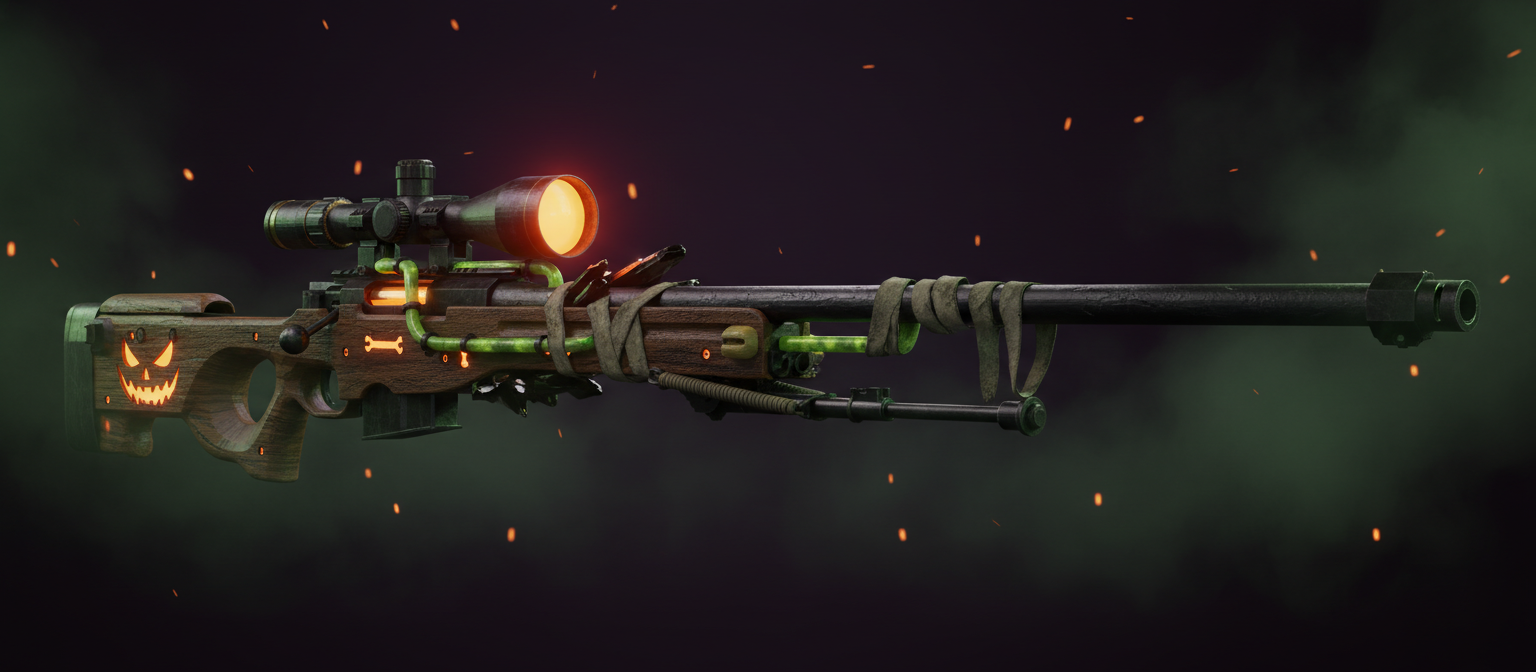
A Halloween DLC pack — concept art, character model, gameplay scene, and animated trailer — built entirely inside Artyx.
Design the AWP Skin
Start with a text prompt: "Halloween edition AWP sniper, skeletal engravings, glowing pumpkin scope, spider web details." AI generates multiple concept directions in seconds.
Build the Player Model
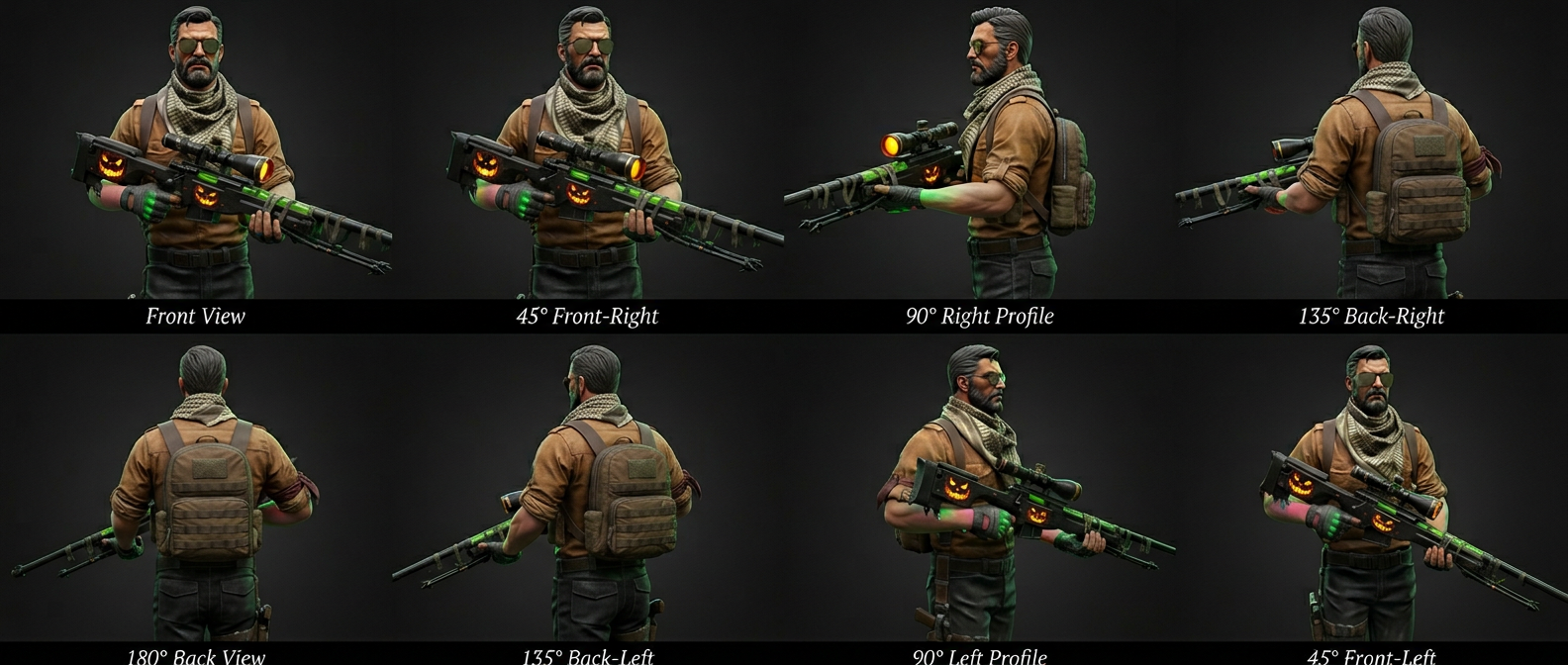
Generate a CS terrorist operator holding the skinned AWP. 360-degree views from every angle — front, back, profile — all consistent from one prompt chain.
Animate the Operator
Then animate it — jumping, running, shooting — from the same generated image.
Set the Scene
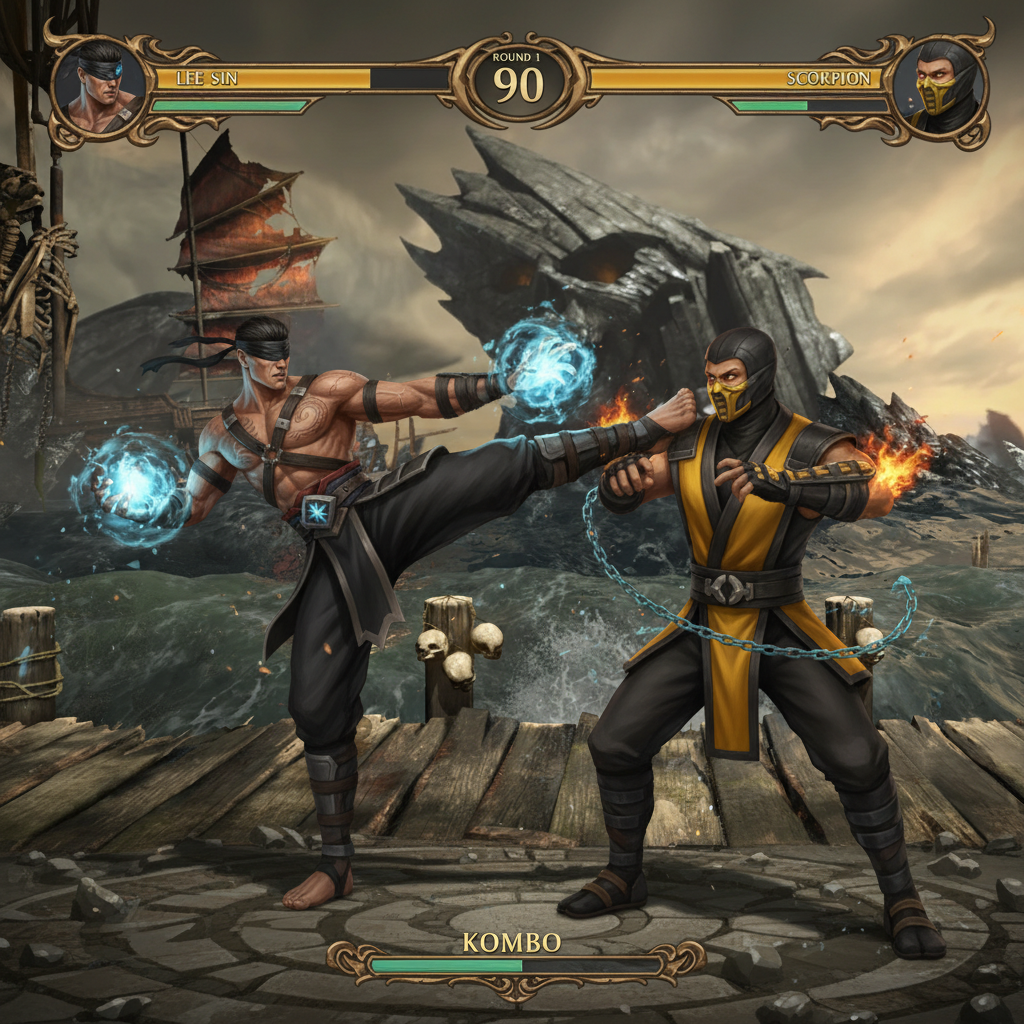
Connect characters, weapons, and environment nodes on the canvas. The AI composes a full gameplay scene — ready for your store page, trailer keyframe, or pitch deck.
Bring It to Life
One click generates an 8-second animated preview. Turnarounds, action loops, promotional clips — straight from your canvas to video.


Frequently Asked Questions
Everything you need to know about Artyx.
> What makes Artyx different from Midjourney, ComfyUI, or other AI tools?
+
What makes Artyx different from Midjourney, ComfyUI, or other AI tools?
Artyx is a full creative studio, not just an image generator. It combines AI generation, a visual node canvas, 3D texturing with real-time preview, video generation, and an autonomous AI agent — all connected in one desktop app purpose-built for game production workflows.
> Do my files get uploaded to the cloud?
+
Do my files get uploaded to the cloud?
Your 3D models never leave your device. Only text prompts and rendered views are sent for AI generation. All file operations are sandboxed to your workspace. Your creative work stays yours.
> What can I create with Artyx?
+
What can I create with Artyx?
Concept art, character design sheets, weapon and equipment skins, environment art, 3D model textures (UV-baked atlases), scene compositions, animated video clips, and more. If it's a visual game asset, Artyx can help you build it.
> Can I use generated assets in commercial games?
+
Can I use generated assets in commercial games?
Yes. All assets you generate with Artyx come with a full commercial license. Use them in shipped titles, DLC packs, mods, promotional material, or any commercial project without attribution.
> What is AGDA?
+
What is AGDA?
AGDA (Autonomous Game Design Agent) is a built-in AI teammate that understands your canvas, your models, and your creative workflow. It can generate images, manipulate nodes, edit textures, remove backgrounds, compose scenes, and run complex multi-step pipelines — all with a human-in-the-loop approval system.
> What platforms and formats are supported?
+
What platforms and formats are supported?
Artyx runs on macOS, Windows, and Linux. Import 3D models (.glb, .gltf, .obj), images (.png, .jpg, .webp, .gif), and reference videos (.mp4, .webm, .mov). Export images, UV texture atlases (4096x4096 PNG), and generated video clips.
Still have questions? [ Contact us ]
Your Next Game Deserves Better Art
Concept art in seconds. Character sheets in minutes. Textured 3D assets ready to drop into your engine. The creative studio that ships with you.